Icon of program: iTunes/MP3 Alarm Clock

iTunes/MP3 Alarm Clock for Windows

  • Free
  • 2.8
    4
  • 11.2K
  • V1.0
Free Download for Windows

View an ad to download for free

Wake up to your own music on Windows

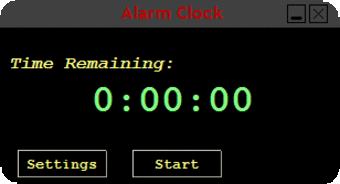
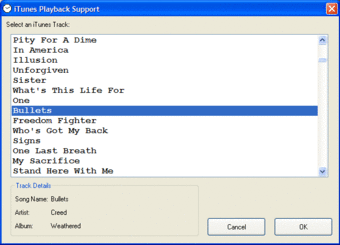
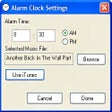
iTunes/MP3 Alarm Clock is a lightweight desktop tool that plays your favorite audio filesMP3, WAV, or iTunes tracks—as alarms. Designed for simple scheduling, it lets users assign a song and a time, with a pop-up message and sound that activates when the clock strikes.

Top Recommended Alternative
You don’t need iTunes installed to use it. The program supports standalone music files and offers basic alarm scheduling, including repeat options. It’s ideal for users who want a no-frills alarm experience without installing full calendar suites or bloated software.

A no-frills desktop alarm with audio flair

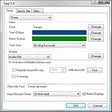
iTunes/MP3 Alarm Clock is designed for a single purpose: triggering alarms with custom audio. Users can select a local MP3, WAV file, or an iTunes track, assign a time, and write a full-screen message with an optional background color. Its small footprint and simple interface make it convenient, though the program must remain open—minimized, not closed—for alarms to function properly. It's straightforward, low-maintenance, and built for utility over visual polish.

This isn’t the kind of tool packed with smart features. There’s no snooze button, no fade-in options, and no way to control alarm volume within the app itself. What it offers is reliability: a static alarm system that rings when it should. Users can run multiple instances to set different alarms throughout the day, making it flexible in a minimalist sort of way. That said, expect a very dated interface and no built-in scheduling complexity.

While it lacks modern features, the program still holds nostalgic value for users who appreciate classic Windows tools. Its age means there’s no active development or tech support, and it may need compatibility settings on newer systems. But for users who just want a dependable, music-based alarm solution without distractions, it delivers on its promises with quiet confidence.

Straightforward alarms without the bloat

If you're after a lightweight, music-based alarm solution for your desktop, iTunes/MP3 Alarm Clock still gets the job done. It’s not made for users chasing modern features or sleek design—but it does offer a nostalgic, no-frills way to wake up to your favorite tracks. As long as you're willing to leave it open and overlook its outdated interface, this vintage utility remains a simple and effective choice for basic desktop alerts.
  • Pros

    • Plays MP3, WAV, or iTunes tracks as alarms
    • Can display full-screen custom messages
    • Small file size and fast setup
    • Supports recurring alarms
  • Cons

    • App must stay open to work
    • No volume control, snooze, or fade-in
    • Outdated interface
    • May not run well on newer Windows versions
 0/2

App specs

  • Developer

    • r.pi
  • License

    Free

  • Version

    1.0

  • Latest update

  • Platform

    Windows

  • OS

    Windows XP

  • Language

    English

  • Downloads

    11.2K

    Last month's downloads

    • 12
  • Size

    1.46 MB

Program available in other languages


Icon of program: iTunes/MP3 Alarm Clock

iTunes/MP3 Alarm Clock for PC

  • Free
  • 2.8
    4
  • 11.2K
  • V1.0
Free Download for PC

View an ad to download for free


User reviews about iTunes/MP3 Alarm Clock

2.8

1 reviews

Add review

Main reviews for you

  • Anonymous user

    Customer service was horrible. I needed help to see if i could get my laptop to wake up, and they offered NO help in achieving this. They said to turn off my wake function on my PC. I later found something on my PC which will do it on its own w/out having to let me notebook ever sleep. But, not with their help, and they are the propeller heads, not me. I wouldn't buy this product just because they offer no help

More

You may also like

Alternatives to iTunes/MP3 Alarm Clock

Explore Apps

Latest articles

Laws concerning the use of this software vary from country to country. We do not encourage or condone the use of this program if it is in violation of these laws.
Softonic

Is iTunes/MP3 Alarm Clock safe?

98/100

Score result: Clean

This file passed a comprehensive security scan using VirusTotal technology. It is safe to download.

  • Virus free
  • Spyware free
  • Malware free
  • Verified by Security Partners

    VirusTotal logo

Scan Info

Last scan
Monday, December 11, 2023
Scan provider
VirusTotal · Full report

File Integrity

File
AlarmInstaller.exe
SHA256
655fd51fa2a9bde05b3a482b72f0cad06af7a086633b8a409aa70b7c985a5843
SHA1
65142c7e7b292b284d083db7c250952271a37be0

Softonic security commitment

iTunes/MP3 Alarm Clock has been thoroughly scanned by our advanced security systems and verified by industry-leading partners. This file comes from the official developer and has passed all our security checks, showing no signs of viruses, malware, or spyware. For more information, visit our Security and Trust Center

Signed in to Softonic as